
Download Podcaster – Free Mac Podcast Publishing Tool
Overview
Podcaster is a lightweight, trial‑version Mac application designed for anyone who wants to publish enhanced podcasts quickly and securely. First added to the catalog in 2006, the program has accumulated over 1,800 downloads and continues to be a solid choice for podcasters who need a straightforward RSS‑based publishing workflow. Running on macOS 10.4 and later, Podcaster occupies far less disk space than most internet‑software utilities, making it ideal for older Mac machines or users who prefer minimalistic tools. The current version, 1.2.2, was last updated on 10 April 2007 and remains fully functional for creating, editing, and distributing podcast feeds. Whether you are a hobbyist sharing weekly interviews or a professional broadcaster looking for a no‑frills publishing solution, Podcaster offers a secure, easy‑to‑use environment that integrates seamlessly with popular podcast directories.
Key Features of Podcaster
- Enhanced Podcast Publishing: Supports RSS 2.0 with iTunes‑compatible tags, allowing listeners to see episode artwork, duration, and explicit content warnings.
- Simple Feed Management: Create, edit, and delete podcast episodes from a clean, intuitive interface without needing command‑line tools.
- Automatic Enclosure Handling: The app automatically generates enclosure tags for audio files, ensuring smooth playback on all major podcast apps.
- Secure Uploads: Integrated FTP/SFTP support lets you upload episodes directly to your server over encrypted connections.
- Built‑in Media Converter: Convert MP3, AAC, and OGG files to the optimal bitrate for streaming, reducing file size while preserving audio quality.
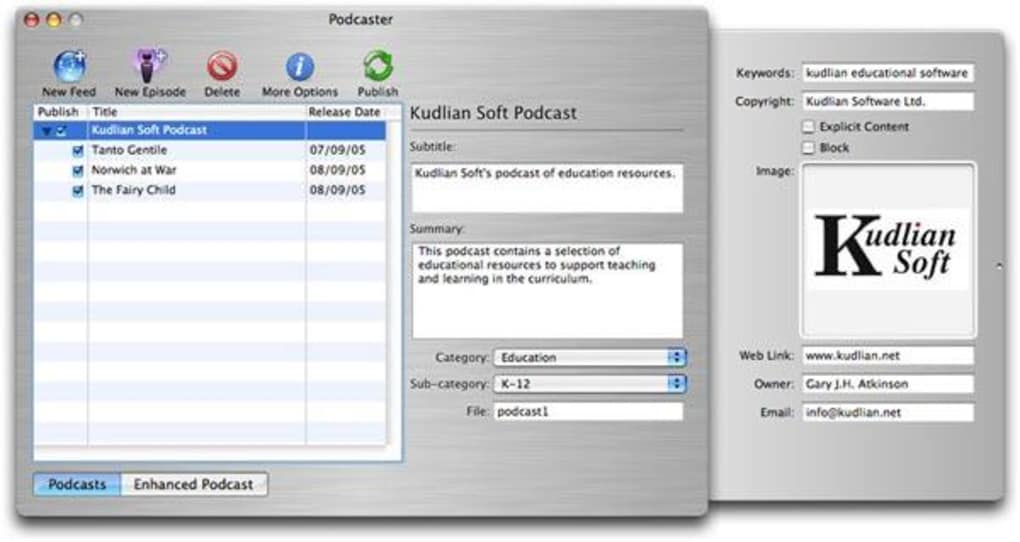
- Customizable Metadata: Add author, category, subtitle, and explicit content flags for each episode, improving discoverability in podcast directories.
- Lightweight Design: Less than 5 MB of storage, fast launch times, and minimal RAM consumption make it perfect for older Macs.
- Trial Version with Full Feature Set: The free trial offers unlimited episodes and full feature access, allowing you to test the app before purchasing the full license.
Installation & Usage Guide
Step‑by‑Step Installation
1. Download the Installer: Click the “Download Podcaster” button on the official website. The file is a standard .dmg package compatible with macOS 10.4 and later.
2.
Mount the Disk Image: Double‑click the .dmg file to mount it. A new window appears showing the Podcaster app icon and an Applications folder shortcut.
3. Copy to Applications: Drag the Podcaster icon into the Applications folder. macOS may request administrator permission; enter your password to continue.
4.
Launch the App: Open your Applications folder and double‑click Podcaster. The first launch will prompt you to allow access to your microphone and files – grant these permissions for smooth operation.
5. Activate the Trial: When prompted, click “Start Trial” to unlock the full feature set for 30 days.
No credit card is required.
Getting Started with a New Podcast
After launching Podcaster, you’ll see a welcome screen with three main tabs: Feed Builder, Episode Manager, and Settings. Begin by clicking Feed Builder and entering your podcast title, description, and website URL. Upload a high‑resolution cover image (minimum 1400 × 1400 px) to meet iTunes standards.
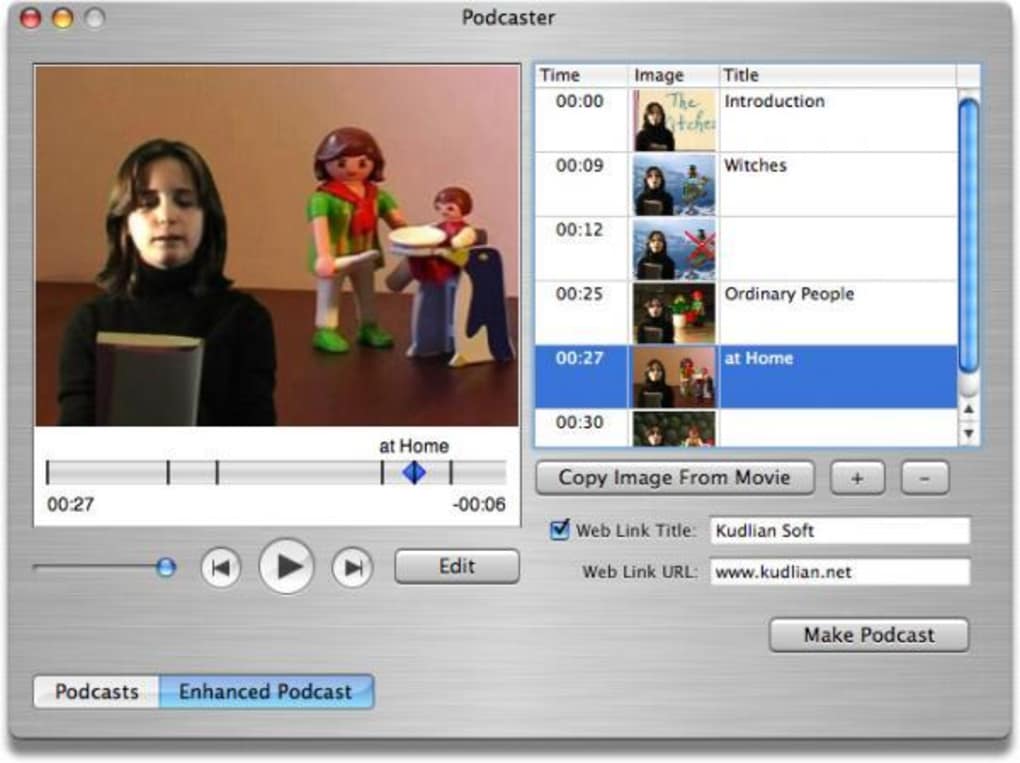
Next, move to the Episode Manager where you can add a new episode by dragging an audio file into the window or using the “Import” button. Fill in episode‑specific metadata such as title, summary, publication date, and explicit flag. The built‑in media converter will automatically optimize the file for streaming.
Once all fields are complete, press “Publish” – the app will upload the file via your configured FTP/SFTP credentials and update the RSS feed instantly. Your episode is now live on all major podcast directories that support RSS feeds.
Troubleshooting Common Issues
If you encounter upload failures, verify that your FTP credentials are correct and that the server allows passive mode connections. For metadata not displaying correctly in iTunes, double‑check that the required iTunes tags (e.g., itunes:author, itunes:image) are present – Podcaster adds them automatically, but older RSS validators may flag missing fields if the feed has been manually edited. Finally, if the app crashes on older macOS versions, ensure you have the latest system updates installed; the lightweight design of Podcaster minimizes compatibility problems, but occasional OS‑level security patches can affect network permissions.
Compatibility, Pros & Cons
Podcaster runs on macOS X (10.4 Tiger) and later, including macOS 10.5 Leopard, 10.6 Snow Leopard, and newer releases up to macOS 12 Monterey. The app is built for 64‑bit Intel architecture, and while it has not been officially updated for Apple Silicon (M1/M2), it operates under Rosetta 2 without performance loss. No Windows, Android, or iOS versions exist, so the tool is strictly for Mac users who prefer a desktop‑based podcast publishing workflow.
Pros
- Extremely lightweight – ideal for older Macs.
- Full RSS‑compatible publishing with iTunes tags.
- Integrated FTP/SFTP upload eliminates the need for external clients.
- Media converter built‑in saves time and storage.
- Free trial provides unrestricted access to all features.
- User‑friendly interface requires little technical knowledge.
Cons
- No native Windows or mobile version.
- Last official update was in 2007 – may lack modern UI polish.
- Limited analytics – users must rely on external services for listener stats.
- Trial version does not include automatic license renewal reminders.
Frequently Asked Questions
Is Podcaster still safe to use despite the last update being in 2007?
Yes. The core functionality – RSS generation and FTP upload – relies on well‑established internet standards that have not changed dramatically. As long as you run the app on a supported macOS version and keep your system security patches up to date, Podcaster remains a secure publishing tool.
Can I use Podcaster to publish video podcasts (vodcasts)?
Podcaster is primarily designed for audio podcasts. While you can attach any file type to an RSS enclosure, many podcast directories only support audio formats. For vodcasts, a dedicated video‑podcast platform is recommended.
Do I need a separate hosting account to use Podcaster?
Yes. Podcaster uploads your audio files to an FTP/SFTP server you specify. You can use any web hosting service that provides FTP access, or a dedicated podcast hosting provider that supplies FTP credentials.
Is there a limit on the number of episodes I can publish with the trial?
No. The trial version unlocks the full feature set without episode caps. You can publish unlimited episodes during the trial period.
How does Podcaster handle episode artwork and branding?
During feed creation, you can upload a high‑resolution cover image that appears in podcast directories. Individual episodes can also include custom artwork, which Podcaster embeds as iTunes‑compatible tags.
Conclusion – Should You Download Podcaster?
If you are a Mac‑centric podcaster looking for a no‑cost, lightweight solution that covers all essential publishing steps, Podcaster still holds its own despite its age. The application’s straightforward interface, built‑in media conversion, and secure FTP uploads make it a practical choice for beginners and seasoned creators alike. While it lacks modern analytics and a Windows version, its core strength lies in simplicity and reliability. Download Podcaster today, test the full feature set during the free trial, and decide whether its minimalist approach fits your podcasting workflow.
Ready to start publishing? Click here to download Podcaster and begin your podcast journey with a secure, free Mac tool.
- Pros: Lightweight, full RSS support, built‑in FTP, free trial.
- Cons: No Windows version, outdated UI, no built‑in analytics.







